img

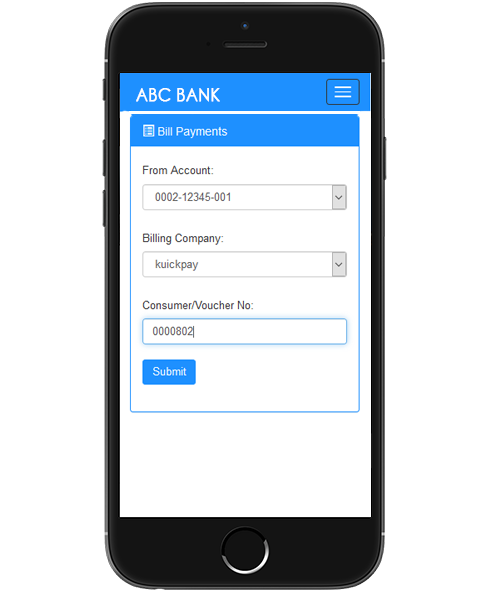
How to pay with Kuickpay

Mobile Banking

Sign in to your Bank’s Internet Banking, Mobile Banking or visit any ATM machine.

Bill Payment

Select Bill Payment / Payments and then select ‘kuickpay’ from given categories.

Voucher Procedure

Enter the voucher or invoice number & proceed. Make sure to enter Institution ID as prefix.

Payments alert

Confirm your voucher details and proceed to payment. Payment alerts will be received accordingly.

ICAS consumer number format is based on Invoice/Challan/Voucher number i.e. 01050+Invoice Number

Digital Partner Banks

Allied Bank
Internet Banking
  • Login to your Internet Banking (click here to login now)
  • Select Pay Bills
  • Select Utility as Category and then Select KPAY as biller
  • Enter Consumer ID 01050XXXXXXX and click Validate
  • Confirm details and Pay
Mobile Banking
  • Login to your Mobile Banking App
  • Select Pay Bills
  • Select Utility as Category and then Select KPAY as biller
  • Enter Consumer ID 01050XXXXXXX and click Validate
  • Confirm details and Pay
Al Baraka Bank
Internet Banking
  • Login to your Internet Banking (click here to login now)
  • Select Pay Bills
  • Select Utility as Category and then Select KPAY as biller
  • Enter Consumer ID 01050XXXXXXX and click Validate
  • Confirm details and Pay
Mobile Banking
  • Login to your Mobile Banking App
  • Select Pay Bills
  • Select Utility as Category and then Select KPAY as biller
  • Enter Consumer ID 01050XXXXXXX and click Validate
  • Confirm details and Pay
Askari Bank
Internet Banking
  • Login to your Internet Banking (click here to login now)
  • Select Pay Bills
  • Select Utility as Category and then Select KPAY as biller
  • Enter Consumer ID 01050XXXXXXX and click Validate
  • Confirm details and Pay
Mobile Banking
  • Login to your Mobile Banking App
  • Select Pay Bills
  • Select Utility as Category and then Select KPAY as biller
  • Enter Consumer ID 01050XXXXXXX and click Validate
  • Confirm details and Pay
Bank AL Habib
Internet Banking
  • Login to your Internet Banking (click here to login now)
  • Select Pay Bills
  • Select Utility as Category and then Select KPAY as biller
  • Enter Consumer ID 01050XXXXXXX and click Validate
  • Confirm details and Pay
Mobile Banking
    n to your Mobile Banking App
  • Select Pay Bills
  • Select Utility as Category and then Select KPAY as biller
  • Enter Consumer ID 01050XXXXXXX and click Validate
  • Confirm details and Pay
Bank Alfalah
Internet Banking
  • Login to your Internet Banking (click here to login now)
  • Select Pay Bills
  • Select Utility as Category and then Select KPAY as biller
  • Enter Consumer ID 01050XXXXXXX and click Validate
  • Confirm details and Pay
Mobile Banking
  • Login to your Mobile Banking App
  • Select Pay Bills
  • Select Utility as Category and then Select KPAY as biller
  • Enter Consumer ID 01050XXXXXXX and click Validate
  • Confirm details and Pay
Bank Islami
Internet Banking
  • Login to your Internet Banking (click here to login now)
  • Select Pay Bills
  • Select Utility as Category and then Select KPAY as biller
  • Enter Consumer ID 01050XXXXXXX and click Validate
  • Confirm details and Pay
Mobile Banking
  • Login to your Mobile Banking App
  • Select Pay Bills
  • Select Utility as Category and then Select KPAY as biller
  • Enter Consumer ID 01050XXXXXXX and click Validate
  • Confirm details and Pay